


Most churches want Sunday to feel smooth. Volunteers should know where to go, media should be ready to play, screens should show the right content, and every room should feel prepared before the first person walks in. When that happens, the experience feels simple from the outside.
What people do not always see is how much coordination sits behind that simplicity. A great Sunday depends on planning, scheduling, media prep, volunteer communication, and content delivery across multiple environments. Classrooms, lobbies, worship spaces, check-in areas, and volunteer rooms all rely on their own workflows, and those workflows need to line up before the day begins.
That is what this article explores. A strong Sunday experience is the result of systems that help teams prepare well, reduce friction, and keep content moving where it needs to go. Keep reading to learn what happens behind the scenes of a great Sunday experience, and how stronger church media workflows can make it easier to create consistency across every room.
A Great Sunday Starts Long Before Sunday
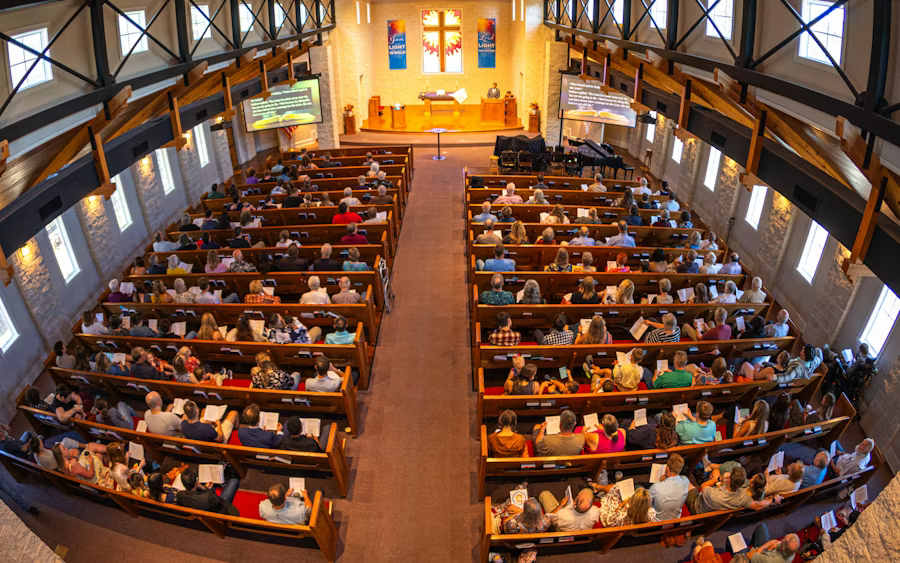
A smooth Sunday morning can make everything feel effortless. Screens turn on with the right content, volunteers know where to go, classrooms are ready, and services move forward without unnecessary friction. From the outside, it can look like everything simply came together at the right time.
What people do not always see is that a great Sunday starts much earlier. It is built through a weekly process of planning, preparation, media coordination, scheduling, and volunteer support. Content has to be gathered, organized, assigned to the right rooms, and made ready for the right teams. The more environments a church manages, the more important that process becomes. A worship space, kids classroom, lobby screen, and volunteer room may all be part of the same Sunday experience, but each one depends on its own media workflow.
That is why Sunday consistency is usually a systems issue, not just a staffing issue. Churches do not create smoother mornings by relying on last-minute effort alone. They create them by building workflows that help people prepare well throughout the week.
The Weekly Timeline Behind a Smooth Sunday
For most churches, Sunday does not begin on Sunday morning. It begins earlier in the week, often through a series of small decisions that build toward the final experience. A sermon series is planned. Curriculum is selected. Announcement content is drafted. Volunteers are scheduled. Media is gathered, edited, uploaded, and assigned to the right rooms. By the time Sunday arrives, a large amount of invisible preparation has already taken place.
Early Week: Planning the Experience
Early in the week, the focus is usually on planning. Ministry leaders decide what each environment needs, whether that is sermon support, kids content, volunteer communication, digital signage, or service media. This is where alignment matters. If teams are not clear on what content is needed and where it needs to go, confusion starts early and tends to grow as the week continues. A strong church media workflow begins with shared visibility, so planning decisions do not stay trapped with one department or one staff member.
Midweek: Preparing the Content
Midweek is often where preparation starts to take shape. Files are collected, slides are updated, videos are finalized, and playlists or screen schedules begin to come together. This is also when churches often feel the pressure of fragmented systems. If content is stored in multiple places or passed between teams without a clear process, simple tasks start taking longer than they should. A team may know what belongs in a room, but still spend unnecessary time locating files, checking versions, or confirming whether the latest update made it through. Good workflows reduce that drag by making the path from planning to playback more direct.
End of Week: Confirming and Handing Off
As the week moves closer to Sunday, the focus shifts toward confirmation and handoff. Teams need confidence that each room has the right media, that volunteers know what they are responsible for, and that playback will be clear when the morning begins. This stage matters because even strong content can create stress if the final delivery process is unclear. The issue is rarely the content itself. It is whether the system around the content helps people execute well under time pressure.
Sunday Morning: The Workflow Becomes Visible
Then Sunday arrives, and the value of the workflow becomes visible. A strong week of preparation creates a calmer morning. Teams are not reinventing the process in real time. They are following a structure that has already accounted for rooms, roles, timing, and content delivery. That does not mean nothing ever changes. It means the church is working from a system strong enough to absorb those changes without losing momentum.
Why This Weekly Rhythm Matters
This is one of the clearest signs of a healthy church media system. Preparation happens before pressure peaks. Content is not just created and stored. It is coordinated, assigned, and made ready for use across the building. When that weekly rhythm is clear, Sunday becomes more consistent, volunteers are better supported, and the whole experience feels more intentional from start to finish.
Every Room Has Its Own Media Workflow
One of the biggest shifts in modern church operations is that Sunday is no longer built around one room alone. The main service may still be the most visible part of the morning, but it is only one part of the overall experience. A great Sunday depends on how well media is prepared and delivered across the whole building, not just on the main stage.
Each room has its own purpose, which means each room has its own media needs. A worship space may need slides, videos, message support, and service elements timed carefully from start to finish. A kids classroom may need curriculum videos, worship tracks, and lesson content ready before families arrive. A lobby screen may need event promos, directional messaging, or announcement loops running between services. A volunteer room may need a briefing video, a process reminder, or simple communication that helps teams feel clear before they begin serving.
These environments may all be part of the same Sunday, but they do not run on the same workflow. They depend on different content, different timing, and different users. The person serving in a classroom may need a very simple playback experience. The person running service media may be working from a much more detailed sequence. A lobby screen may need content that updates regularly but runs with very little hands-on attention once it is scheduled. Each of these spaces needs the right media, but the way that media is prepared and delivered can vary significantly.
That is why church media coordination matters so much. Churches are not simply managing content. They are managing content across multiple environments at the same time. The challenge is not only choosing what each room needs. It is making sure those needs are planned for early, handed off clearly, and supported by a system that makes playback reliable on the day.
This also explains why Sunday starts to feel harder as churches grow. More rooms mean more workflows to manage. More ministries mean more content types to prepare. More volunteers mean more handoff points where confusion can creep in. Without a clear church media system, each room starts to operate like its own island, and the overall experience becomes harder to keep consistent.
Strong church media workflows help solve that by creating structure across all those environments. They give teams a shared way to prepare content, assign it to the right spaces, and make sure each room is ready before the morning begins. That does not mean every room works in exactly the same way. It means every room is supported by a workflow clear enough to reduce confusion and flexible enough to meet the needs of the space. That is what allows a church to create a Sunday experience that feels connected from one room to the next.
Where Sundays Usually Start to Break Down
Most Sunday disruptions do not come from one major failure. They usually come from a series of smaller gaps that build pressure across the week. A file is hard to locate. A volunteer is unsure which version is final. A room has not been updated with the right content. The schedule changed, but not everyone saw the update. None of these issues seems major on its own, but together they can make Sunday feel far more reactive than it should.
One common breakdown point is content access. Churches often have the media they need, but getting to it quickly is another matter. Files may be stored across multiple platforms, labeled inconsistently, or passed between teams without a clear process. When that happens, even simple preparation starts to slow down. Teams spend time searching, double-checking, or recreating things that may already exist.
Another issue is inconsistent handoff. Sunday preparation usually involves multiple people, including pastors, ministry leaders, production teams, and volunteers. If responsibilities are not clear, small communication gaps can carry over into the final setup. One room may be fully prepared while another is still waiting on content, instructions, or confirmation. The problem is not always a lack of effort. It is often a lack of shared workflow.
A third breakdown point is a last-minute change without a clear system for adjusting. Churches are dynamic environments, and changes happen. A video gets replaced. A slide order shifts. A classroom plan gets updated. Those church content management changes can happen when the system is clear. They become stressful when teams are relying on scattered files, verbal updates, or memory to keep everything aligned.
This is why Sunday problems often point to workflow problems underneath. The issue is rarely one missing file or one confused volunteer. It is the absence of a system strong enough to keep content, communication, and delivery aligned across the week. The clearer the system is, the less likely it is that small problems will affect the overall experience.
How Centralized Media Systems Reduce Sunday Stress
One of the clearest differences between a reactive Sunday and a smooth one is whether the church is working from a centralized media system. When content is spread across different drives, inboxes, platforms, and personal workflows, every stage of preparation becomes harder to manage. Teams may still get everything done, but they often do it by relying on extra checking, repeated follow-up, and last-minute problem-solving. That creates pressure that builds quietly across the week.
Centralization helps reduce that pressure by giving teams a shared point of reference. Instead of wondering where a file lives, which version is current, or whether another department has already updated it, teams can work from a clearer system. That improves visibility across the workflow. Ministry leaders, production teams, and volunteers do not have to rely as heavily on memory or verbal updates because the content is easier to locate and easier to track.
This also improves coordination across rooms. A great Sunday depends on more than the worship space being ready. Kids' classrooms, volunteer rooms, lobbies, and check-in areas all need media that is accurate and prepared on time. When each environment is pulling content from different places or using a different process, the likelihood of inconsistency rises. A centralized system helps keep those environments aligned by creating a more dependable path from preparation to delivery.

Another benefit is that centralization reduces duplicate work. Churches often spend time recreating slides, re-sending files, or rechecking plans simply because the workflow is fragmented. A more centralized approach makes it easier to reuse content, update it once, and deploy it where it needs to go without repeating the same setup steps across multiple teams. That saves time, but it also creates more confidence in the final result.
Centralized systems are especially helpful when changes happen late in the week. A schedule update, a revised video, or a last-minute room adjustment is much easier to manage when the workflow is already clear. Teams can respond faster because they are not trying to fix a scattered process under pressure. They are working within a structure that already supports handoff, visibility, and delivery.
This is why centralization matters at an operational level. It does not just keep media more organized. It helps reduce stress, improve consistency, and make Sunday preparation more manageable for everyone involved. In churches where many people and many rooms depend on media at the same time, that kind of clarity makes a meaningful difference.
What Great Church Media Systems Actually Do
A strong church media system does more than help content move from one screen to another. It gives teams a clearer way to prepare, communicate, and serve across the full Sunday experience. That matters because the goal is not simply to avoid mistakes. It is to create a workflow that is steady enough to support people well every week.
One of the biggest benefits is reduced stress. When content is organized, scheduled, and assigned ahead of time, teams do not have to solve the same problems over and over again on Sunday morning. They can spend less time chasing files, clarifying instructions, or checking whether the right media made it to the right room. That makes the whole environment calmer and easier to manage, especially for churches working with lean staff teams or rotating volunteers.
Strong media systems also improve consistency. Every room does not need the same content, but every room does need the right content at the right time. A clear workflow helps classrooms stay prepared, lobby screens stay current, volunteer spaces stay informed, and services stay aligned with the plan for the day. This consistency shapes the experience people have as they move through the building. It also gives ministry leaders more confidence that Sunday will run the way they intended.
Just as important, good systems make it easier for volunteers to serve well. Most churches rely heavily on volunteers to help run Sunday environments, but volunteers need workflows that are clear, repeatable, and easy to follow. When media systems reduce extra steps and remove guesswork, volunteers can focus more on people and less on troubleshooting. That does not just make Sunday smoother. It makes volunteer roles more sustainable over time.
This is why church media workflow matters at an operational level. The best systems do not draw attention to themselves. They create the conditions for better preparation, better handoff, and better execution across the whole church.
Where Playlister Fits
By this point, the issue for most churches is not whether they have content. It is whether that content can move smoothly through the workflow and reach the rooms where it is needed. This is where Playlister fits within the system.
Playlister functions as the orchestration and delivery layer. It helps churches take content that has already been planned and prepared, then make it usable across the environments that shape the Sunday experience. That includes classrooms, volunteer rooms, lobbies, check-in areas, and other ministry spaces where content needs to be clear, ready, and easy to run. In practical terms, it helps bridge the gap between preparation and playback.
That role matters because many churches already have the raw pieces in place. They have videos, slides, curriculum, announcements, and training content. What they often need is a more dependable way to organize delivery across multiple rooms without creating extra manual work each week. A system that supports playlist building, scheduling, and simpler playback gives teams more control over how content moves through the building and less dependence on last-minute setup.
This is especially important for volunteer-heavy environments. Most churches rely on volunteers to help run classrooms and other ministry spaces, which means the workflow needs to be easy to follow. When playback is clearer and preparation happens earlier, volunteers can step into their role with more confidence. That creates a better experience for the team and a more consistent experience for the people in the room.
Features like drag-and-drop playlists, centralized scheduling, YouTube importing, and automatic captions support that process by reducing friction across the week. They help content stay easier to prepare, easier to deliver, and easier to use in the spaces where ministry actually happens.
Playlister does not replace the planning, people, or ministry decisions behind Sunday. It supports them. Its role is to help churches move from scattered preparation to a more coordinated church media workflow, where content is easier to manage, and every room is better equipped before the morning begins.
Great Sundays Are Built Through Better Systems
A great Sunday experience may feel simple in the moment, but it depends on a lot of preparation behind the scenes. Content has to be planned, organized, assigned to the right rooms, and made ready for the right teams. When those pieces work together, Sunday feels smoother for everyone involved.
That is why church media workflow matters. It helps churches move from reactive preparation to repeatable systems. Instead of depending on last-minute fixes, teams can build a process that reduces stress, supports consistency, and makes it easier for volunteers to serve with confidence. As churches manage more rooms, more media, and more moving parts, that kind of structure becomes even more important.
Playlister fits into that process as the orchestration and delivery layer, helping your church media squad turn preparation into usable, room-ready content across the building. But the larger takeaway is simple: strong Sundays are the result of systems that help teams prepare well before the first person walks through the door.